
Brand Ready by Karen Howley
Make every document your team or AI produces instantly on-brand.
Tell us about your brand. We'll have your branded Word template and AI skill package ready in 48 hours.
Brand Ready is the missing layer between your brand and your AI tools.
Sound familiar?
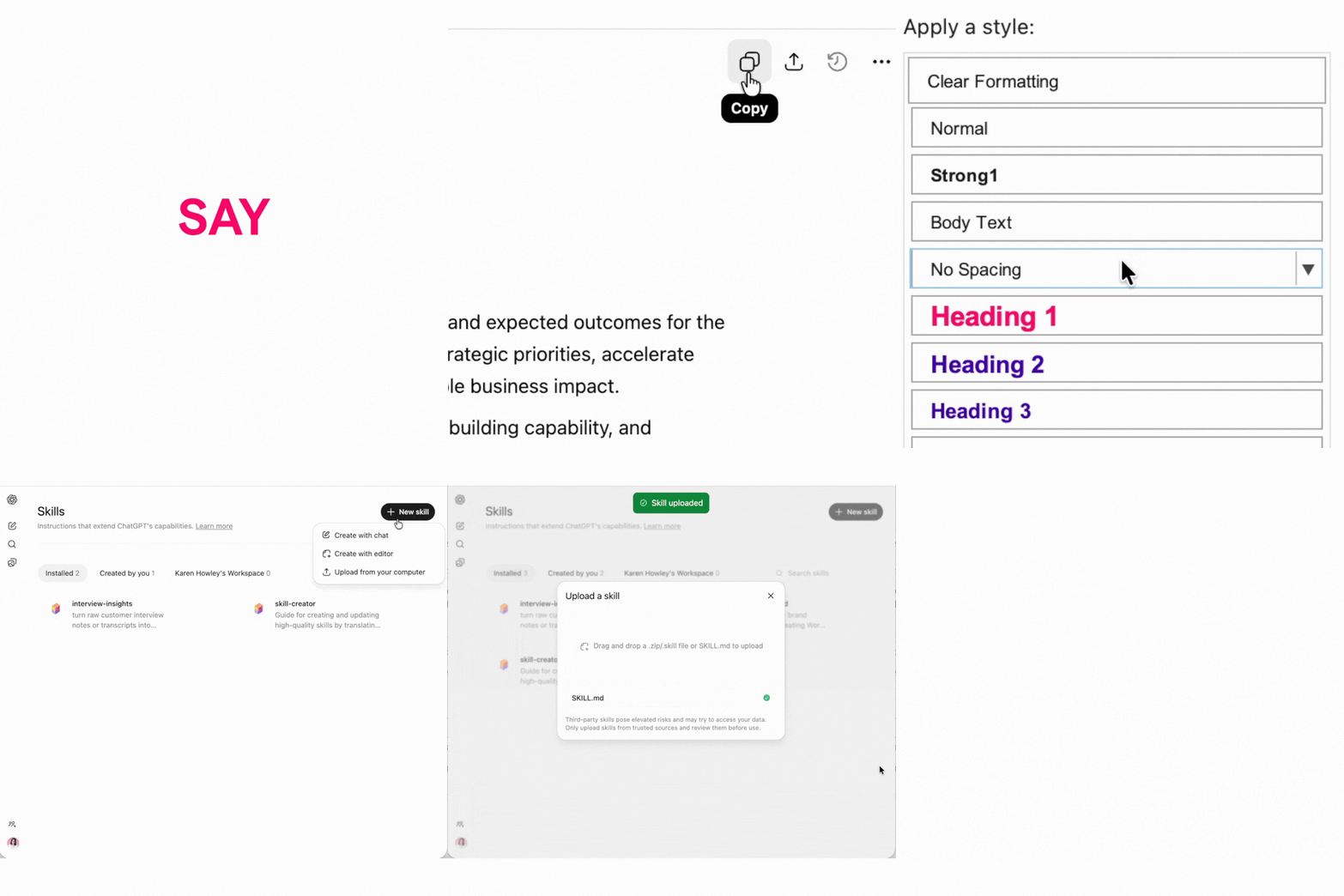
Copy. Paste.
Reformat. Every single time.
AI drafts something useful. Then you spend twenty minutes fixing the fonts, heading colours and spacing before it can leave the building.
You do it again tomorrow. And the day after. Every document. Every time.
The time you saved generating it with AI gets spent reformatting it back into your brand.
Brand Ready means you never reformat AI output again.
Your brand is already built in.
What you get
One URL in. Three deliverables out.
Submit your website. Within 48 hours you receive everything you need to make your AI tools produce on-brand output, automatically.
- First bullet item
- Second bullet item
What is a skill?
A skill is a small file you install once in Claude or ChatGPT. After that, every document, artifact, deck or response those tools create automatically uses your brand — colours, font and voice.
Most people have never installed a skill before. That's fine. Every Brand Ready customer gets full access to the resource hub with step-by-step articles and videos for each platform, troubleshooting guides, and tips for getting the best branded output. It gets updated as the tools change.

How it works
From your website to a brand-ready system in four steps.
No technical knowledge needed. Under five minutes on your side — we handle the rest.
Pay & confirm your order
Choose your plan and complete payment. You'll receive an immediate confirmation email with a link to your brand intake form.
Takes 2 minutesComplete your brand intake form
Confirm your brand colours, flag any digital-only colours, and supply your logo link if you have one. This is where you shape your output.
Takes 3 minutesWe build your package
We use your website and the brand details you provide to build your Word template, AI skill package and brand instructions file — ready to use in 48 hours.
We handle thisReceive, install & go
Your complete Brand Ready package lands in your inbox. Follow the included guides to install your skill — done in under five minutes.
Delivered within 48hYour total time commitment: under 5 minutes. Submit your URL, complete the form — your package arrives within 48 hours, ready to use.
What customers say
I was able to install our brand toolkit and try it out, and everything looks great. It is really easy to set up, and the templates are very helpful for quickly creating standardised branded documents and formatting content from AI.
Mary
Salaso
Learn before you buy
New to AI skills? Start here.
Not sure how Brand Ready works or whether it fits your tools? These three articles will answer your questions before you commit.
Start here
Which AI tools work with Brand Ready?
Not every platform supports Brand Ready in the same way. Find out how it works with Claude, ChatGPT, Copilot and Google Docs before you buy.
Read the article →Start here
What's the difference between a brand skill and a branded Word template?
Brand Ready delivers two things. This explains what each one does and when you'd use it — so you know exactly what you're getting.
Read the article →Start here
What are skills?
Skills are small files you install once in Claude or ChatGPT. After that, every document and response those tools create automatically uses your brand.
Read the article →Pricing
Simple, flat pricing. No subscription.
Pay once. Use your template and AI skill package forever.
Brand Ready
ex VAT · €134 inc VAT · one-time payment
Less than the cost of a single design day.
Everything included
-
✓
Branded Word template (.docx) Configured styles in your exact brand colours and typography
-
✓
AI skill package (.zip) For Claude and ChatGPT — install once, branded output every time
-
✓
Full access to the Brand Ready Resource Hub Video walkthroughs and step-by-step guides for Claude, ChatGPT and Copilot
-
✓
Delivered within 48 hours Of completing your brand intake form
Have a question before you buy? Get in touch